

Sharing
Every artifact has a visibility. Click Share on the artifact page to change it.
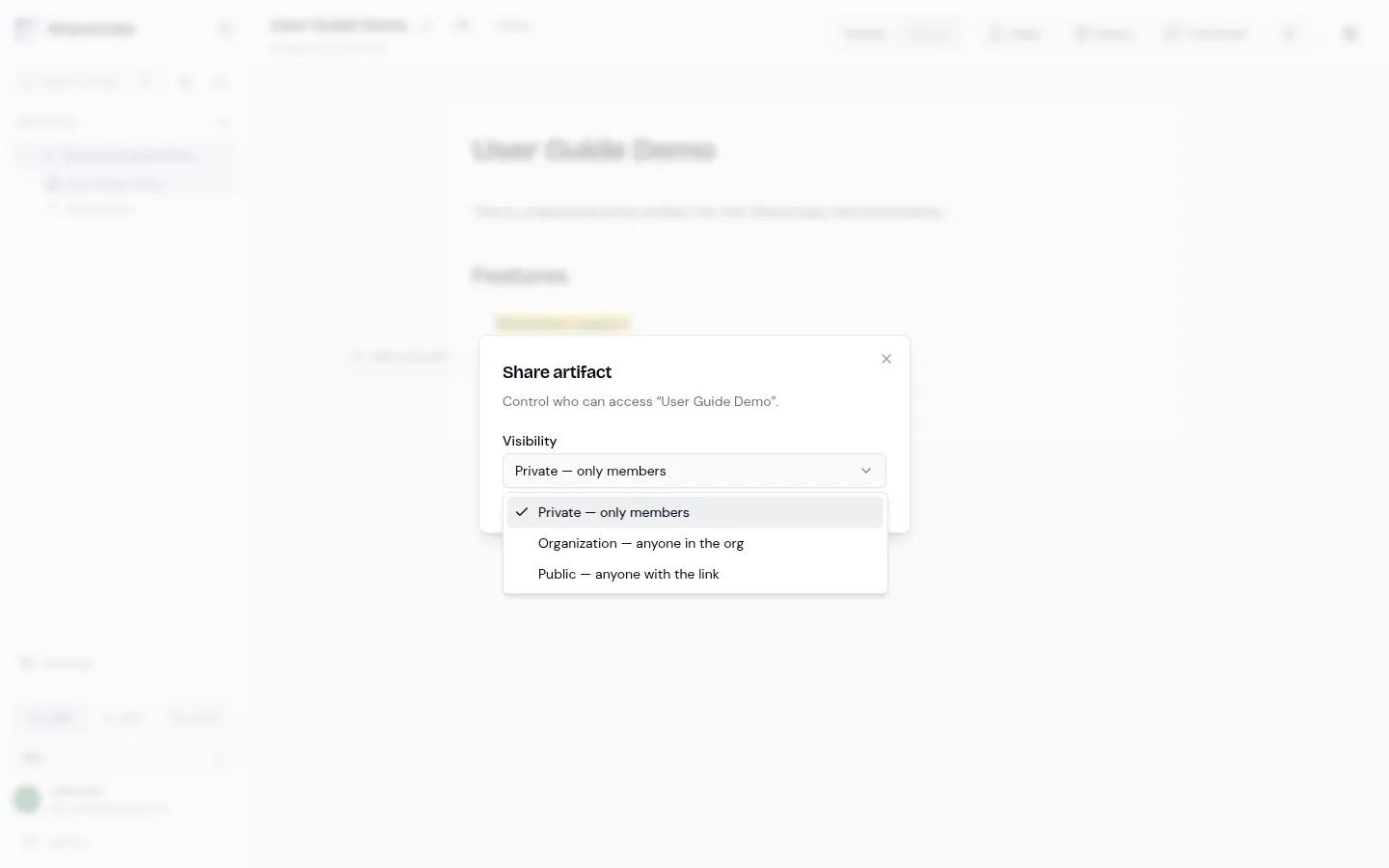
Visibility levels
Section titled “Visibility levels”| Visibility | Who can open it |
|---|---|
| Private | Project members only. |
| Organization | Anyone in the same org, even if they are not on the project. |
| Public | Anyone with the link. No ShareCube account required to view. |
The share dialog also sets what a link grants: Viewer or Commenter. A link never grants Editor. Anonymous visitors can view a public artifact. They cannot comment. Commenting on a public or org link still requires a signed-in user.
Org maximum
Section titled “Org maximum”Organization Owners and Admins set a maximum sharing policy under Settings → Organization:
- Private (most restrictive)
- Organization
- Public
Members cannot share above that ceiling. Lowering the maximum does not rewrite existing artifacts. It only blocks new shares that would exceed it. If you need older public docs pulled back, change those artifacts one by one.
Short links
Section titled “Short links”Tick Short link in the share dialog to share /s/your-name-k7p2 instead of the long /share/{id} link. It opens under exactly the same rules as the long link, so a private artifact stays private.
On the Free plan you choose the name and ShareCube adds a random four-character ending, so nobody can claim a bare name like /s/acme. Renaming keeps the ending. Pro and Team can choose the whole link.
Organization Owners and Admins can turn short links off under Settings → Organization. Turning them off stops existing short links from opening; turning them back on brings the same links back.
People outside your organization
Section titled “People outside your organization”Project Owners can share a whole project, or a single artifact, with anyone by email: a client, a partner, family. They don’t need to join your organization or have a paid plan.
- Open Share on an artifact, or the People button on a project.
- Under People outside your organization, enter their email address and choose Editor, Commenter, or Viewer.
- They get an email. They sign in (or sign up) with that address and accept. Signed-in users also see the invitation under Settings → Invites.
Once accepted, the work appears under External in their sidebar, in every organization they switch to. They see only what you shared: a single artifact shares just that artifact, not the rest of the project.
| People outside your organization | |
|---|---|
| Roles | Editor, Commenter, or Viewer. Never Owner: they can’t manage people, change visibility or links, or delete. |
| Seats | Viewers and Commenters are free. Editors count toward your plan’s editor limit. |
| How many | Free: 5 people. Pro: 25. Team: unlimited. Pending invitations count. |
| Search | Shared work never appears in their organization’s search or graph, and they never see yours. |
| Agent | They can use the agent on what you shared. It’s billed to their own personal organization, never yours or their employer’s. |
| Leaving | They can leave at any time. You can change their role or remove them at any time, and it takes effect immediately. |
Invitations expire after 14 days. You can resend one (the old link stops working) or withdraw it. If someone declines, you’re told; no reason is given.
Organization Owners and Admins can turn sharing outside the organization off under Settings → Organization. That stops new invitations; people already invited keep their access until an owner removes them.
Share URLs
Section titled “Share URLs”There are two useful links:
- Console URL (
/projects/.../artifacts/...) is the editor. Use this for teammates who should comment or edit. - Share URL (
/share/{id}) is the public viewer. Access still depends on visibility. If the artifact is private, the share page will not show it.
When an agent publishes an artifact, it gets both URLs back. Hand people the console URL if they need to work on it, and the share URL if they only need to read it.
What “like a gist, but rendered” means
Section titled “What “like a gist, but rendered” means”A public ShareCube link is a rendered page, not a raw file dump. HTML canvases stay designed. Markdown stays readable. The artifact is not locked inside Cursor, Claude, or any other vendor chat.